







View the app in your preferred language
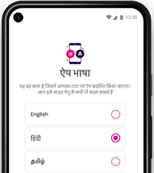
Use the Tata Play Mobile App in your native language. Get TV shows and movie recommendations suited to language preferences.
- Enjoy exclusive Tata Play Services
- Catch up with Live TV
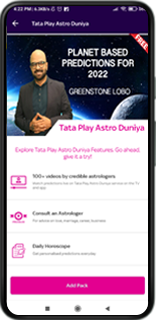
- Watch shows on demand
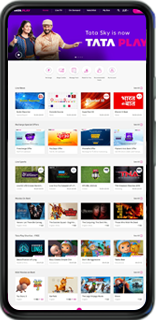
Get more convenience at your fingertips

Recharge instantly

Get special offers

Manage your account

Manage your packs

View your shows anywhere, anytime
Your shows are available on 2 screens at the same time
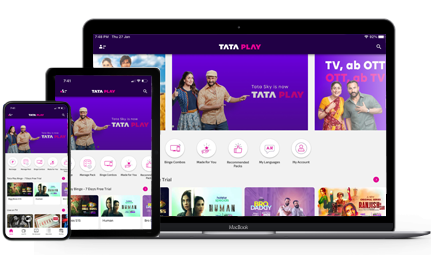
Your shows are available on 2 screens at the same time
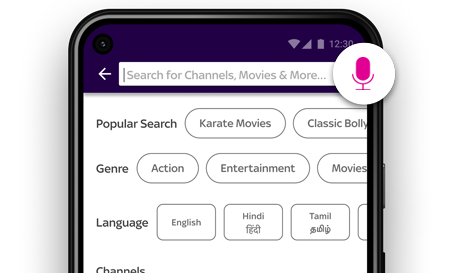
Get all the information you need on packs, channels or available languages quickly. With voice commands, the search becomes easier.

Access information easily with smart search
Get all the information you need on packs, channels or available languages quickly. With voice commands, the search becomes easier.

Control your TV with the Mobile App
Use your mobile as a full remote, gesture remote or quick remote - with just one convenient tap.
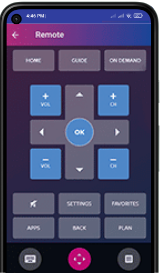
Use your mobile as a full remote, gesture remote or quick remote - with just one convenient tap.
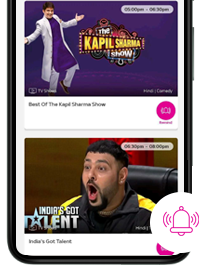
Browse through 3-day programme listings and synopses and set reminders to receive timely alerts.

Never forget your favourite shows
Browse through 3-day programme listings and synopses and set reminders to receive timely alerts.
Increase your enjoyment with future-ready features
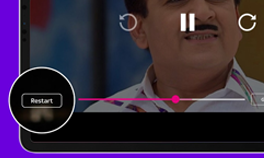
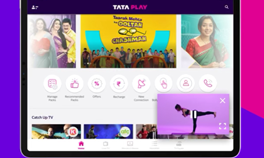
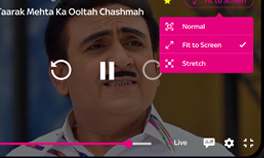
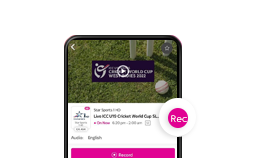
Carry your TV wherever you go!

Scan the code to download the Tata Play Mobile App
FAQs
Tata Play Binge App FAQ’s
What you get
- What are the various sections in the App?
Tata Play Mobile Application has 5 sections :
- Home: Get the best of the content on offer here : From Live TV to On Demand to TV Shows. Everything that you need to watch!
- Live TV: Not in-front of your TV? No worries. Get live TV on your fingertips so you never miss any ongoing action.
- On Demand: Choose from a host of TV shows, Movies and web content served on your demand. Also, catch up on most of your missed TV shows from previous 7 days anytime and anywhere.
- Watchlist: Keep all your favourite shows and channel here and access them quickly.
- My Box allows you to see the schedule of all the channels Tata Play offers.
Login & onboarding
- Who can use the Tata Play Mobile App?
Anyone can download the Tata Play Mobile App and access the content in it, but only active Tata Play Subscribers are enabled to watch their favourite content basis on the package they are subscribed to.
- How do I get to access/view to the content? OR How do I login to the app?
To access/view Live TV, On Demand and all other services of the Tata Play Mobile App on your Android/iOS devices, you need to follow the following steps:
- Log into the App using any of the following details:
- Your Subscriber ID
- Your Registered Mobile Number
- You now have to enter the OTP sent to your Registered Mobile Number or enter your mytataplay.com password to complete the login process.
Now you are ready to view the content of your choice.
- Log into the App using any of the following details:
- I don’t remember my mytataplay.com password.
You can reset your password by selecting the "forgot password" option. We will send a temporary password to you on your registered email and mobile number which you can use to login and reset your password.
- On how many devices can I use the Tata Play Mobile app?
You can login to the app from a maximum of 10 devices. However, you can view Live TV, On Demand on a maximum of 2 devices simultaneously per subscriber ID.
- Why can I view Live TV / On Demand service only on 2 devices simultaneously?
Content providers’ agreements with Tata Play stipulate that Tata Play Live TV channels, Tata Play On Demand episodes and titles can be viewed on a maximum of two devices simultaneously per subscriber ID at any given time.
- Can I login using more than 10 devices?
Yes, you can do so only after deleting the devices that you no longer use from the Device Management option in the app.
Access to various services
- I am not a Tata Play subscriber can I still access the service?
You can view certain free content such as movie trailers, however you need to be an active Tata Play subscriber to access the Live TV and On Demand videos.
- My Tata Play account is currently de-active due to lack of funds; can I still use Live TV/On Demand service?
You need to be an active Tata Play subscriber to enjoy Live TV channels and On Demand videos on your device. De-active subscribers can now recharge their accounts by selecting “Recharge” option on the app.
- Can I watch Live TV and On Demand videos outside India?
No. You need to be in India to be able to use the Tata Play Mobile services.
- Why can’t I watch live TV and On Demand videos outside India?
Tata Play provides services only within the territory of India.
General app related questions
- How do I see the schedule of a channel?
To see the schedule of a channel you should select a channel in Live TV section and then select 'Schedule' option. You can see the schedule for the next 3 days and previous 7 days.
- Who can set programmes for record?
Only Tata Play+ HD subscribers can set recording on their set top boxes using the record option from the app.
- How do I set a programme for remote recording?
- In Live TV section, select the programme from a channel you want to record and on the programme details page you will get an option to set it for remote record.
- On selecting the record option, you will get a confirmation screen stating the programme has been successfully set for recording on your Tata Play + HD box.
- Remote recording functionality can be used by Tata Play+ HD/ Tata Play+ Transfer subscribers only. Any other subscriber who tries to record will get a failure message.
- How do I set a reminder for a programme?
Reminders can be set for future programmes only.
To set a reminder for a programme, tap on the programme name. You will be able to see the set reminder button. Press the button to set a reminder. You will receive a notification on your device when it’s time for the programme.
Live TV section
- How do I watch Live TV on the App?
You can select any channel in the Live TV section or any live programme to view it Live on your device.
- Will I be able to access all the features like Parental control, Plan etc on my Tata Play set top box on Live TV?
No. Currently, Live TV service on your device offers only streaming of Live TV channels.
- I am unable to access Live TV services?
Please ensure the below to enjoy uninterrupted access to Live TV:
- You have a device that supports Tata Play Mobile app.
- You are connected to the internet.
- If you are out of the country, you will be unable to use Live TV & Tata Play On Demand streaming services.
- Your Tata Play connection is in active state with sufficient funds in your account.
- You can access Live TV for only those channels that are part of your subscription package.
- Can I access Tata Play services such as 'Tata Play Fitness' and others in the Live TV section?
Yes, we have many Tata Play service channels live, like Tata Play Fitness, Tata Play Senior Citizens
- I am not able to view certain channels on Live TV?
You can only view those channels on Live TV which you have subscribed for viewing on the set-top box. To enjoy all the channels available on Live TV, you would need to subscribe the respective channels on your set-top box as well.
- Why are all the channels not available on Live TV?
Tata Play always keeps expanding its offering of channels on the set top box. In a similar fashion, we will expand and bring more channels on Live TV soon.
- I have subscribed to a channel on the set-top box. Yet when I access this channel on my activated device, I am getting the following message: “Sorry this programme is not available for viewing on Live TV”?
The broadcaster does not have the rights to stream this programme on mobile devices. The Live TV service on your device will resume once the next programme starts.
- How can I see all the shows available for the day on a channel?
You can select the schedule option on the channel detail page to see the schedule for the channel.
- Can I rewind shows on Live TV?
You can rewind up to 15 minutes on Live TV.
- Can I change the video quality of the Live TV?
Yes, you can select any one of the following quality settings available under the settings option. These options are available on the video player as well.
- High – Gives best quality as per your network speeds.
- Medium – Limits your video quality to medium even if your network speeds allow for better viewing quality to save data.
- Low – Limits your video quality to low even if your network speeds allow for better viewing quality to save data.
- Auto – Adjusts as per the network bandwidth.
- Will I be able to view commercials as a part of the Live TV feed & Tata Play On Demand episodes on the App?
Yes. Tata Play does not change the channel feed. You will be able to see the same feed on your set-top box and on your device.
On Demand section
- What is On Demand?
On Demand section is where you can access popular movies, TV shows and short videos from across the web You can also view previous – 7 days catch up of your missed shows on your favourite channels.
- How can I watch previous episodes or catch up on my favourite programs?
You can watch this in the other episodes on schedule of live channels, On Demand section of the app or you can also look for the episode in search.
- Will previous episodes or shows be available for all channels?
Previous episodes or Catch up shows will be available for most of the channels available on the app. Tata Play keeps expanding its offering of channels on the set top box. We will similarly expand and make more channels & catch-up available soon on the app.
- Can I fast forward, pause or rewind videos?
Yes. You can fast forward, pause or rewind On Demand content. Just tap on the screen while viewing the video in full screen mode. Then drag on the progress bar to the position you wish to start viewing the video from.
- Is there a limit to the number of times I can watch a video in Tata Play On Demand?
No. You can watch the video as many times as you wish.
My Account section
- What is ‘My Tata Play’ section in the app?
My Tata Play section in the app is a self-care portal that gives you access and enables you to manage your Tata Play account. You could Recharge your account, view and modify your packs and much more
- What will I require to access the ‘My Account’ section?
You will require your password used with www.tataplay.com for the Subscriber Id used to log into the app.
- What if I do not remember the password for my Subscriber Id?
You can tap on ‘Forgot password’ to generate a new password. All previous logins where the old password are being used will be logged out.
- Do I get all the features and functionalities that are available on tataplay.com?
Yes, you get all functionalities as available on tataplay.com through the My Account section in the app. This includes Recharge, Pack changes, etc.
Handset related
- What are the devices Tata Play Mobile App will be available on?
Tata Play Mobile App is available on Android phones & Tablets with the following minimum requirements
- OS version: 4.4 & above
- Minimum CPU: Dual core 1.2 GHz
- Minimum RAM: 1 GB
- iOS: Tata Play Mobile app will be available on iOS with following minimum requirements
- iOS version: 9 & Above
- Web: You can access the app on the browser of your laptop/computer by going to the link https://watch.tataplay.com
- Recommended browsers: Google Chrome & Firefox.
- Supported browsers: Opera, Edge, Safari & IE
- Is this service also available on Windows Phone & Nokia Symbian or Blackberry Phones?
No. Currently the service is only for selected supported devices mentioned above.
- I have Samsung S3 with version 4.0, can I use the app?
No. Tata Play service is accessible only through the Tata Play Mobile app on the devices and OS versions 4.4 and higher on Android and iOS 9 and higher in iOS devices.
- I have activated Live TV on my device but why do I see a message saying “This Device is not supported”?
Owing to Tata Play’s security agreement with content providers, Tata Play Mobile app is not supported on jailbroken/ rooted devices.
- I am trying to play videos on watch.tataplay.com. Why does it say "HDCP Error Detected"?
We make sure that we are following high standards of security for both our customers and content partners High-bandwidth Digital Content Protection (HDCP) compliance is required to stream videos on watch.tataplay.com.
If this message has been displayed on your device then most likely your display, connecting HDMI cables or connecting devices are not HDCP compliant.
If your connection is HDCP supported, then you can try these steps to resolve the issue:
- Unplug the connecting HDMI connection.
- Restart your display by powering it off.
- Reconnect HDMI cables firmly at both ends.
You can also try streaming on another display or enjoy streaming on Tata Play Mobile app.
- Can I watch Live TV or stream videos via 3G/4G/Wi-Fi whilst a download is in progress?
Yes, although the quality of the Live TV or streaming of video will depend on the amount of 3G/Wi-Fi bandwidth available.
- What is the best resolution for viewing on the browser?
Website is best viewed on scren width > 1170 px (eg. 1366*768, 1280*800)
Internet related
- Do I need an internet connection on my device to access Tata Play Mobile App?
Yes. You need to be connected to the internet to stream any video or view Live TV.
- What are the data charges that I would be charged with while accessing Tata Play Mobile app?
The data charges applicable would be as specified by your internet/mobile service provider. Please check with your internet/mobile service provider for the applicable data charges.
- Do I need a good internet connection to enjoy Live TV/Tata Play On Demand services?
Having a good internet connection with a speed of 2 MBPS or higher enables you to enjoy a better-quality video while viewing Live TV or streaming videos on Tata Play On Demand. However, you can still play a video in low quality with 512 kbps connection.
- What type of internet connections can be used to access Live TV service?
The service works on all Internet connections i.e. 4G/3G mobile connections or on broadband/ Wi-Fi internet connections.
- What is the recommended speed to enjoy a good streaming experience on Wi-Fi?
The recommended speed for a good streaming experience on Wi-Fi is 2Mbps. Minimum speed to play video in low quality is 512kbps.
- I am on 4G connection; however, the quality of the video is still poor?
Speeds on mobile internet fluctuate depending on the signal strength, due to which the quality of the video may also vary.
- Why is the video quality different when I am viewing on my Wi-Fi internet connection at home and on my mobile internet connection?
The video quality depends on the speed of your internet connection. You will have a better video quality on a faster internet connection as compared to a slower internet connection.
- What will happen when I switch between cellular network and Wi-Fi while viewing Live TV?
The viewing will not be interrupted, and as mobile devices have capability of giving priority to Wi-Fi connection, the app player will switch to higher or lower streaming profile as per the availability of bandwidth on the Wi-Fi
- I am watching live TV, I moved from a cellular network to Wi-Fi? Will streaming continue
The viewing will not be interrupted and as mobile devices have capability of giving priority to Wi-Fi connection, the app player will switch to higher or lower streaming profile as per the availability of bandwidth on the Wi-Fi.
- My device is showing 'Device limit full' when I log in or when I launch the app
Tata Play App allows limited number of devices to be logged in at a time. Please remove the devices as mentioned to enjoy the sevices on your device.
All devices can be removed except Tata Play Binge+ and Tata Play Binge. Browsers will be automatically removed every midnight
- I am not able to rename the device
Tata Play offers device rename option for all devices except browsers as per the following rules:
- Maximum length for device name : 50 Characters
- Allowed special Characters : Single Space and '_'
- Device name should be unique
- Please note autogenerated names might include more than 50 characters and special characters as part of Manufacturer Name or Device
- I am trying to play videos on Mobile/Tab, why does it say 'Content Viewing is available for HDCP compliant devices only'
We make sure that we are following high standards of security for both customers and our content partners High-bandwidth Digital Content Protection (HDCP) compliance is required to stream videos on Tataplay App(mobile/tablet)
If this message has been displayed on your mobile/tablet device then most likely your device is not HDCP compliant. In order to make a device compatible to play HDCP-enabled content, the manufacturer must obtain a license for the device.Please contact the device manufacturer for more information.
You can also try streaming on another display or device.